Fundamentals
It’s important to understand basic GIS concepts before you dive into using complex GIS software and begin using it for your research.
Geospatial Data
Geospatial data is essentially data that incorporates a location or geographic reference.
A traditional dataset might contain information about a group of trees:
| Species | Height | Age |
|---|---|---|
| Ponderosa Pine | 18 m | 42 years |
| Aspen | 12 m | 35 years |
| Douglas Fir | 25 m | 67 years |
A geospatial dataset could include the same information along with the location of each tree:
| Species | Height | Age | Latitude | Longitude |
|---|---|---|---|---|
| Ponderosa Pine | 18 m | 42 years | 40.58 | -105.08 |
| Aspen | 12 m | 35 years | 40.59 | -105.07 |
| Douglas Fir | 25 m | 67 years | 40.57 | -105.09 |
Adding geographic information allows us to ask additional questions, such as:
What trees are most common in certain regions?
This ability to connect data to location is one of the fundamental strengths of geospatial analysis. It allows us to draw relationships to other variables to recognize patterns and make decisions.
Geospatial visualizations are also one of the most effective ways of sharing scientific topics to the general public and highlighting important relationships.
One of the benefits of geospatial data is that there is no one software or one way to use it. There are a multitude of methods for accessing it.
Ways to use GIS
There are two main types of GIS software, Open Source and Proprietary.
Open Source software are free tools for processing geospatial data. They are available to download online and don’t have paywalls.
Examples
- QGIS
- GRASS GIS
- Whitebox
- GAT
- GeoServer
- SAGA GIS
While Open Source software can be used freely, one downside is that it may not always offer the same level of detailed analysis that a proprietary product can offer. However, it’s best to learn how to use Open Source software if you are planning on working on independent research projects, working with non-profits, or don’t use GIS enough to justify the cost of the alternative.
Proprietary Software are GIS applications that offer in-depth analysis capabilities, interactive GUIs, and are leaders in the GIS field. They are best for if you want to work with a company on GIS work, are conducting research with a university, or are pursuing GIS as a career. The only downside is that these services are often expensive, especially if you have to pay for them yourself. The two most popular proprietary GIS software products are ArcGIS and MapInfo Pro (Envitia).
Vector vs. Raster
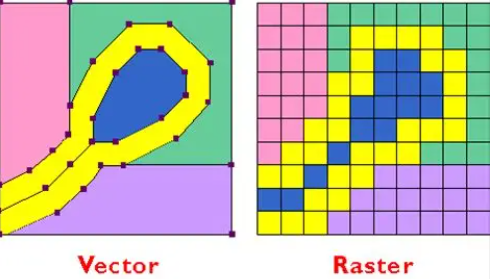
When working with geospatial data, knowing what type of data you are working with is imperative. The two main types of geospatial data are Vector and Raster. Both are beneficial though serve very different purposes.
Vector Data
Vector data is data that is always in the form of a Point, Line, or Polygon. Polygons in the case of vector data just symbolize any multi-dimensional shape, such as a circle or square.
Vector data is commonly used for Discrete features, representing objects with distinct spatial boundaries. Individual vector features can hold multiple attribute values in an attached data table. It is especially good for Comparison, Navigation, and Computations, and is useful for establishing Regions of Interest (ROIs) for research projects.
Vector data is not as suited for looking at continuous data alone. However, using it with raster data is.
Raster Data
Raster data is great for continuous data that changes over very small distances. Raster data is a form of data that comes in a grid of squares that each represent a certain value based on a real-life surface area. Raster data is best for displaying real-world variables such as Elevation and Surface Reflectance.
We will go more in-depth on the uses and applications of vector and raster data later.
Layers
Layers make up the whole of any geospatial visualization. Layers are each a different group of features that appear in a map that you are making. Here is an example of a mountainous map and its potential layers:
- Layer 1: Different types of vegetation.
- Layer 2: Watershed layer that is able to map out the entire flow of rivers within your region of interest.
- Layer 3: Road layer that shows all the roads that are present in your map.
With these three layers alone, you can make informative observations. One example is looking at the difference in predominant vegetation next to rivers and roads vs. far away from rivers and roads. You can also compare the contour of the river to the road.
As you add more layers, you will be able to draw more conclusions to make decisions. Some examples are if you have a wildfire layer, you can look at the occurrence of wildfires and their proximity to roads. Or if you have a water quality layer, you can look at the proximity to roads and forests and the differences in water quality.
The applications of GIS layers are endless; we will go more in depth in a later section on how to build workflows in common GIS software that allow you to analyze spatial data for any purpose.
Coordinate Systems & Projections
If you try to take an orange peel and completely flatten it into a circle so that all the skin can been seen at once, what happens? You aren’t able to without cutting the orange in some way and rearrange the shape of it to do so.
Similarly, if you tried to flatten the earth into a two-dimensional plane, you would have to distort its shapes, areas, distances, or directions. This fundamental challenge is why map projections exist. Map projections provide mathematical ways to transform the three-dimensional surface of the Earth onto a flat map while minimizing specific types of distortion.
Next Steps
After looking at some of the basic GIS concepts, checkout the Geospatial Centroid’s Resource page to continue learning GIS.